
How controlled are your Planview data workflows?
Critical Planview data work still moves through spreadsheets, manual checks, system exports and repeated updates. FoliosFlow helps teams prepare and validate proposed changes, execute approved updates within the customer environment, and retain evidence of every run.
FoliosFlow runs inside the customer environment and does not require a DDF-hosted SaaS execution layer for Planview automation.
No name, email address or contact details required for the assessment.
Where is manual Planview data work creating risk?
Answer a short set of questions about exports, spreadsheets, approvals, bulk updates, reconciliation and audit evidence. Get an immediate view of your workflow control level.
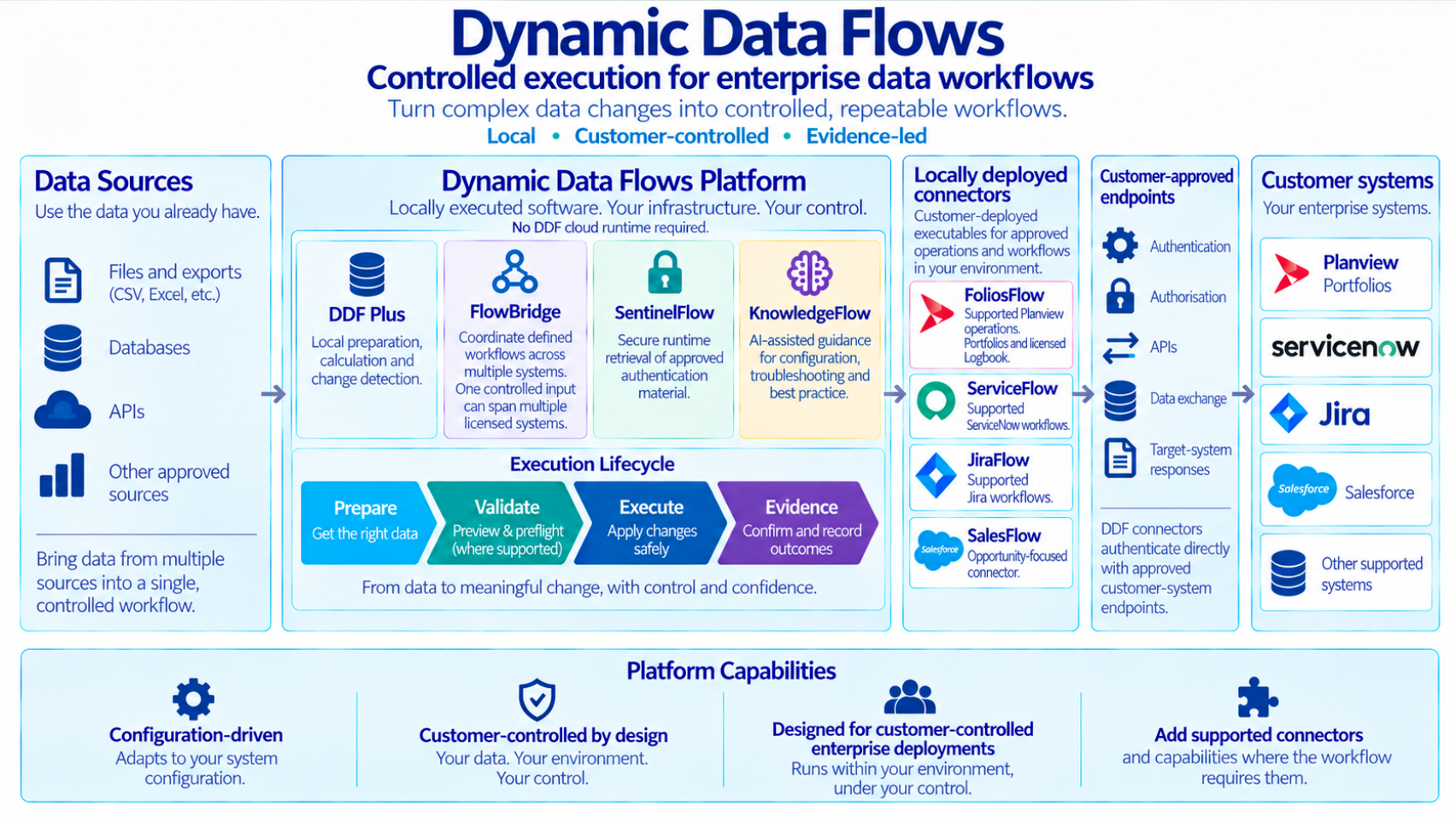
Prepare. Validate. Execute. Evidence.
FoliosFlow applies the DDF governed pattern to Planview data workflows: prepare what should happen, validate what should change, then execute only what is approved and visible.
Prepare
Start from structured inputs teams already use and combine them with supported Planview data where required to produce an approved, target-ready dataset.
- CSV, Excel, JSON and API inputs
- QueryLocal joins, filtering, transformation and data preparation
- Customer-specific mappings and configuration
Validate
Compare, calculate and preflight locally before anything is sent to Planview.
- Detect what actually changed
- Apply customer-specific business rules
- Separate ready, review and rejected records
- Preview proposed creates and updates
Execute and evidence
Run approved changes through supported Planview APIs or controlled file workflows, then retain outputs, failures and reconciliation evidence.
- Local customer-controlled execution
- Approved API-driven updates
- Reviewable evidence after every run
Preview first. Execute second. Evidence always.
Planview data workflows often sit outside enterprise control.
Important data still gets moved by exports, spreadsheets, inbox requests, copied values, manual checks and one-off scripts. The result is effort, risk and uncertainty about what changed.
Slow
Manual reconciliation and repeat updates consume operational time every cycle.
Error-prone
Repeated admin creates inconsistencies that may only surface downstream.
Hard to control
Scripts and workarounds can be difficult to govern, approve, evidence and rerun safely.
Hard to prove
Teams often know an update ran, but cannot easily prove what changed and why.
FoliosFlow turns recurring Planview data work into controlled, repeatable and evidenced workflows.
Change what needs changing. Verify what actually changed.
Where Plus Edition is licensed and comparison rules are configured, SmartSync can compare structured source data - including Excel, CSV or supported system reads - with Planview data so teams can focus on meaningful differences before execution and reconcile intended versus actual results afterwards.
1. Detect the delta
Identify new, changed, missing and unchanged records using agreed comparison fields before execution.
2. Execute only what matters
Reduce noise, unnecessary API calls and avoidable processing by acting only on approved differences.
3. Read back and reconcile
Compare intended target state with actual results so only verified outstanding differences become candidates for correction or replay.
The safest update is often the one you do not make.
Your Planview workflow does not have to start with an API.
DDF can work with supported system APIs, but it can also work from structured exports such as CSV, Excel and JSON. That matters during migration, data readiness and controlled loading.
Start with the data you have
Use Planview extracts, legacy PPM exports, reporting outputs or spreadsheet-based operational data.
- Planview and PPM exports
- Excel and CSV operational data
- Legacy system extracts
Prepare and validate locally
Shape, map, compare and calculate locally before anything reaches the target system.
- Identify missing and incomplete values
- Resolve source values to target fields and options
- Apply customer-specific business rules
- Separate ready, review and rejected records
Load and reconcile
Execute approved migrations and compare actual target state against what you intended to load.
- Read back target results where required
- Preview proposed creates and updates
- Retain validation and execution evidence
The source can be an export. The process can still be governed.
Planview workflows we help control.
Start with one risky, recurring workflow. Make it controlled, repeatable and evidenced. Then expand.
User and resource administration
Turn approved admin requests into controlled updates with logs and outputs.
Project and attribute updates
Validate and update controlled project data at scale without manual rekeying.
Financial and master-data loads
Prepare, validate and execute structured financial or master-data changes with reconciliation.
Planview Logbook migration
Discover metadata, map by business meaning, create records and reconcile results.
Scoring and data-quality correction
Apply business rules, detect missing or incorrect values and prepare reviewed corrections.
Migration and cross-system workflows
Move approved data between Planview, structured files and connected enterprise platforms where the workflow requires it.
Prepare. Validate. Execute. Evidence.
The controlled execution layer for Planview data operations.
FoliosFlow is the immediate DDF product for Planview teams. It provides controlled execution and run evidence for supported Planview data operations. Plus Edition adds local data preparation, calculation, change detection and enhanced reconciliation. Dedicated Planview Logbook capability is available where licensed.
FoliosFlow
Replace spreadsheet-led updates, manual administration and fragile scripts with controlled Planview workflows that run inside the customer environment.
- Supported Planview API operations
- Local customer-controlled execution
- Run-level evidence and reconciliation outputs
- Plus Edition: QueryLocal, CalcLocal and SmartSync
- Dedicated Planview Logbook capability where licensed
- Preview and preflight controls for supported workflows
Why teams use it
- Keep operational data and execution under customer control
- Work with real customer configuration and metadata
- Apply business rules before live updates
- Focus review and execution on records that matter
- Retain evidence of what changed, failed, was skipped or needs review
Extend only when the workflow requires it.
DDF can apply the same governed pattern across connected systems once a defined workflow genuinely spans more than Planview.
ServiceFlow
Controlled ServiceNow workflows within the supported and validated scope.
JiraFlow
Controlled Jira workflows within the documented supported scope.
SalesFlow
Salesforce Opportunity-focused connector, following the same controlled local pattern.
FlowBridge
Controlled orchestration across licensed systems, files and local processing steps.
Proven in real enterprise scenarios.
FoliosFlow has grown from real Planview delivery work and controlled customer proof programmes, not from an abstract integration-platform concept.
Shaped by real security, scheduling and credential constraints.
Measured in one real enterprise workflow.
Business changes distinguished from technical-update noise.
Inputs, outputs, failures and reconciliation results retained.
Proven in production, with advanced capabilities validated through controlled real-world testing.
Built for controlled enterprise environments.
FoliosFlow is designed to work within existing customer security and operational boundaries. It does not seek to bypass them.
Local execution
Runs inside the customer environment, without an intermediary DDF SaaS execution layer.
Vault-aware credentials
Supports CyberArk, 1Password and Windows Credential Manager.
Preview and preflight
Produce validation outputs and previews for supported workflows before approved execution.
Audit evidence
Every run is logged, traceable and reviewable.
KnowledgeFlow helps teams configure with confidence.
FoliosFlow licensing includes access to DDF knowledge support for configuration patterns, inputs, outputs and common workflow approaches.
- Plain-English configuration guidance
- Troubleshooting and output interpretation
- Reusable working patterns and examples
- Faster onboarding for new workflows
Built from real enterprise delivery work.
Dynamic Data Flows Ltd is a UK-based software company created from hands-on enterprise delivery experience, where critical Planview data was still being moved, checked and corrected through spreadsheets, manual processes and one-off scripts.
DDF combines Planview specialist depth, product engineering and connected-system expertise to make recurring data operations safer to repeat.
Company details
Dynamic Data Flows Ltd
Registered in England and Wales
Company number: 16489897
Learn more about the people behind DDF on our About page, or contact us about a product, partnership or customer requirement.
Start with one Planview workflow that matters.
DDF can support focused evaluations, live deployments and wider multi-system workflow programmes. Scope depends on connector, environment and business outcome.
Assess
Understand where manual data workflows may be creating operational risk.
- Free 5-minute assessment
- No contact details required
- Immediate result
Prove
Use a real, bounded workflow to prove the control pattern against customer data and configuration.
- Defined business outcome
- Clear evidence and acceptance
- Defined scope and decision point
Deploy and expand
Turn the proven workflow into repeatable operational capability and extend only where value is clear.
- Annual licensing
- Support and updates
- Optional Logbook, Plus and connected-system expansion
Which Planview workflow would you most like to make safer to repeat?
Start with the assessment, or talk to DDF about a specific Planview update, migration, Logbook, data-quality or reconciliation challenge.